post 5: ALM for Copilot Studio Agents: Dev, Test, Production Without Surprises
Solutions, environment strategy, and pipelines as governance controls
TL;DR
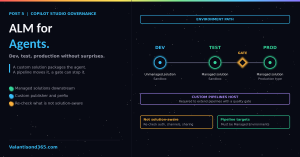
- Every Copilot Studio agent is created inside a Power Platform solution, by default the Default Solution unless you set a preferred one. To export, import, and manage an agent between environments you need a custom solution. That step is where lifecycle governance starts.
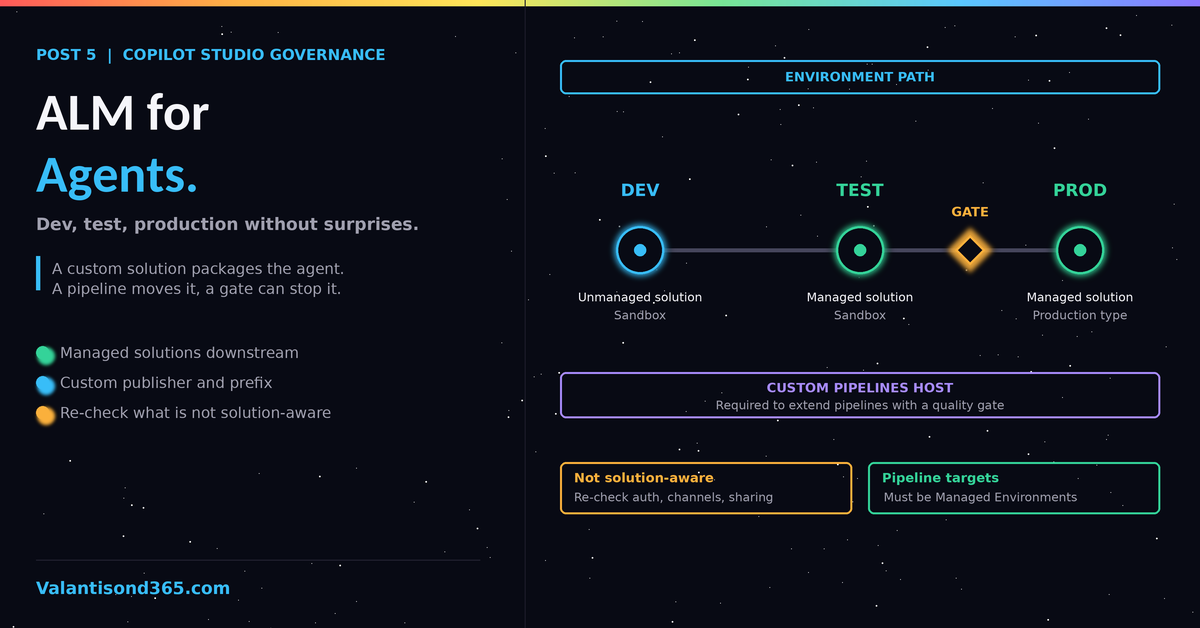
- The ALM guidance sets a baseline of at least three environments: development, test, and production. Production is a production-type environment, every other environment is sandbox, and each one is restricted with an Entra security group.
- Export and deploy managed solutions everywhere except development. Sharing, manual authentication settings, and deployed channels are not solution-aware, so they must be re-verified in every target environment after every deployment.
- Pipelines in Power Platform require every target environment to be a Managed Environment. Automated pass or fail gates before production require a custom pipelines host.
- This guidance is written for agents built on the standard harness. Check the scope note before applying it to GitHub Copilot harness agents.
Why ALM is a governance topic
Zoned governance for Copilot Studio ties lifecycle controls to who an agent serves. The first zone covers personal agents: they live in developer environments, environment routing keeps them isolated to the maker, and sharing is disabled. The second zone covers team and department agents: ALM pipelines are used for agent versioning, and IT approves publishing. The third zone covers professional development, where agent development uses organizational standard ALM practices and the strongest security controls. Source: Reference 3.
The wider an agent’s audience, the more it needs a controlled path between environments. An agent that serves a team or the organization without that path has no tested promotion route and no record of which version runs where.
The building blocks
Solutions
A solution acts as a carrier for your agents. When an agent is created, it is added automatically to a default solution, and you can change the preferred solution. Moving agents between environments is a different matter: you need to create and use a custom solution to export, import, and manage them. The solution explorer inside Copilot Studio covers viewing, exporting, importing, setting the preferred solution, and pipelines. It inherits the security role privileges of the signed-in user, so a user can only do the solution management tasks they could do in the Power Apps admin center. Source: Reference 1.
Environment strategy
A healthy strategy includes at least three environments: development, test, and production. Configure production as a production-type environment and every other environment, development and test included, as sandbox type. Secure every environment by applying an Entra security group so only its members can access it. A custom pipelines host adds a fourth environment: four is recommended and three is the minimum. Source: Reference 2, Reference 4.
The ALM golden rules
The guidance currently lists seven:
- Do not customize outside of a development environment.
- Always work in the context of solutions.
- Use a custom publisher and prefix.
- Create separate solutions only if you need to deploy components independently.
- Use environment variables for settings and secrets that change across environments.
- Export and deploy solutions as managed, unless setting up a development environment.
- Consider automating ALM for source control and automated deployments.
The same guidance also calls for connection references for environment-specific connections and credentials. Source: Reference 2.
Managed does not mean untouchable. You can remove an unmanaged layer from a managed agent (open the solution, select the agent, then Advanced, then See solution layers). When an agent behaves differently in test and production, add a solution layers check to the review. Source: Reference 1.
| Not everything is solution-aware. Copilot Studio includes items that do not follow the normal solution deployment process and need post-deployment steps in each downstream environment: Azure Application Insights settings, manual authentication settings, Direct Line and web channel security settings, deployed channels, and sharing with other makers or end users. Several of these are governance controls, so a successful deployment does not prove the target environment is configured safely. Verify authentication, channel security, and sharing in test, and again in production, after every deployment. Source: Reference 2. |
Pipelines and automation
Copilot Studio agents have three ALM automation options:
| Tool | Documented positioning | Best for | Setup complexity |
| Pipelines in Power Platform for Copilot Studio | Simplifies deployments for citizen developers using deployment pipelines built into the Power Platform. | Organizations empowering citizen developers | Low (few minutes setup) |
| GitHub Actions for Power Platform | Automates ALM-related tasks for developers and admins using the GitHub platform. | Dev and admin teams managing multiple environments | Moderate (requires GitHub setup and scripts) |
| Azure DevOps | Enterprise-grade ALM with advanced CI/CD and source control. | Enterprise teams needing full ALM control | High (requires configuration and expertise) |
Source: Reference 2.
Governance controls built into pipelines
These apply to pipelines run from a custom host. Source: Reference 4.
- Every target environment must be a Managed Environment. Managed Environments are not required for the host or for developer environments. Tenant admins can turn on automatic conversion of pipeline environments to Managed Environments.
- Every environment used in a pipeline needs a Dataverse database.
- Access is controlled by security roles in the host. Deployment Pipeline User can run pipelines shared with them. Deployment Pipeline Administrator has full control. Users also need access to every environment the pipeline touches.
- The host gives you a central view of deployment activity, an audit of where each solution version is deployed and who initiated the request, error logs and validation results, and retained backups of solution artifacts by version.
- A dedicated production environment for the host is recommended, because deleting the host environment deletes all pipelines and run data.
Quality gates before production
The first option is a pipeline that pauses a deployment request, runs automated tests with the Copilot Agent Kit (previously named Copilot Studio Kit), evaluates the results, and proceeds only if they pass. It uses three environments: a pipeline host, a development source environment where the Kit is installed, and the production target. Source: Reference 5.
A second option is the Agent Review Pipeline. When a deployment starts, it evaluates the agent in the source solution with deterministic checks and AI-driven checks of design patterns and instruction compliance, scores it, and approves or rejects the deployment against a configurable threshold (default 60). It requires a custom pipelines host, because the platform host and personal pipelines can’t be extended. It also needs a GitHub repository for the action and a Microsoft Entra app registration (service principal) for Dataverse API access; the full Copilot Agent Kit installation is not required. The AI stages consume Copilot Studio messages on every run, so plan capacity if you deploy often. Source: Reference 6.
Two cautions from the same page are worth building into the design. The GitHub token is stored as a plain-text environment variable by default, so production setups should use an environment variable secret backed by Azure Key Vault. And the flow must set a rejected status from an error handler, because a failed run that never sets a status leaves the pipeline stage hanging. Source: Reference 6.
Testing as part of the lifecycle
Copilot Studio includes test sets for evaluating agents. Test questions can be created manually, generated from the agent’s instructions, capabilities, and knowledge, or populated from past test chat conversations. Three evaluation methods are currently included: text match, similarity, and quality, which rates relevance, groundedness, completeness, and abstention. The testing strategy also covers security and compliance testing: role-based access control, conditional access, and sensitivity label enforcement, plus confirming that no confidential data leaks. Source: Reference 7.
Before production, three checks apply that are governance work rather than testing work: validate data policies and RBAC in the production environment, review and approve Azure resources such as integrated app registrations, VNets, keys, and endpoints, and make sure production knowledge sources and documents are referenced for production agents. Source: Reference 7.
| The knowledge source swap. A failure specific to agents: the solution deploys, but the agent still points at the development SharePoint library. The testing guidance lists this check explicitly, especially when different knowledge sources were used in development and testing. Give it a named line in the deployment checklist with a named owner. |
Minimum viable ALM by audience
- Personal use (first zone): a personal developer environment through environment routing. Sharing stays disabled and no pipeline is needed. If the agent matters to anyone else, it moves up a tier.
- Team or department use (second zone): the agent lives in a custom solution with a custom publisher, is promoted from development to test to production through Power Platform pipelines, is deployed as managed, and targets Managed Environments. IT approves before publishing.
- Enterprise use (third zone): everything in the team tier, plus organizational standard ALM: source control through Git integration with Azure DevOps or GitHub (use it in developer environments, not in test or production; Reference 11), an automated quality gate before production on a custom pipelines host, and a recurring review of deployment approvals.
| Scope: which harness the agent runs on. Copilot Studio now runs agents on three harnesses: the standard harness, the GitHub Copilot harness, and the Copilot chat harness. An agent can’t be transferred between the GitHub Copilot and standard harnesses, so the choice is made once, before building. The Learn solutions article this post relies on is written for the standard harness, and this post does not claim every feature applies to GitHub Copilot harness agents. The Agent Academy training for that harness describes the same solution-based path (agents stored in solutions, exported as managed, deployed through pipelines). Test each feature on a non-production agent on that harness before relying on it. Source: Reference 1, Reference 8, Reference 9, Reference 10. |
Lessons Learned
- The agent is in a solution from the first click, but by default that is the Default Solution, which is not the one you move between environments. Creating a custom solution with a custom publisher before the first export is the actual ALM decision.
- Environment variables and connection references decide whether a deployment is a promotion or a reconfiguration. Set them up in the first solution, not the fifth.
- Treat the non-solution-aware list as a deployment checklist. Authentication, channel security, and sharing are the items most likely to differ between test and production.
- Pipelines make Managed Environments mandatory for every target environment, so settle that before the first promotion, not during it.
References
- 1. Create and manage solutions in Copilot Studio, Microsoft Learn: learn.microsoft.com/en-us/microsoft-copilot-studio/authoring-solutions-overview
- 2. Establish an application lifecycle management strategy, Microsoft Learn: learn.microsoft.com/en-us/microsoft-copilot-studio/guidance/alm
- 3. Implement a zoned governance strategy, Microsoft Learn: learn.microsoft.com/en-us/microsoft-copilot-studio/guidance/sec-gov-phase2
- 4. Create a pipeline using a custom pipelines host, Microsoft Learn: learn.microsoft.com/en-us/power-platform/alm/custom-host-pipelines
- 5. Automate testing and deployment of agents using pipelines in Power Platform, Microsoft Learn: learn.microsoft.com/en-us/microsoft-copilot-studio/guidance/kit-automate-test-deploy
- 6. Use the Agent Review Pipeline as a CI/CD gate, Microsoft Learn: learn.microsoft.com/en-us/microsoft-copilot-studio/guidance/kit-agent-review-pipeline
- 7. Design a testing strategy for your agents, Microsoft Learn: learn.microsoft.com/en-us/microsoft-copilot-studio/guidance/sec-gov-phase4
- 8. Harnesses in Copilot Studio, Microsoft Learn: learn.microsoft.com/en-us/microsoft-copilot-studio/harnesses-overview
- 9. Agents powered by the GitHub Copilot harness, Microsoft Learn: learn.microsoft.com/en-us/microsoft-copilot-studio/agents-experience/overview
- 10. Mission 03: Creating a Solution for Your Agent (GitHub Copilot harness), Microsoft Agent Academy: microsoft.github.io/agent-academy/recruit-nextgen/03-creating-a-solution/
- 11. Overview of Git integration in Power Platform, Microsoft Learn: learn.microsoft.com/en-us/power-platform/alm/git-integration/overview