Post 12: Programme Governance, Acceptable Use, and Operations
How to structure Copilot governance as a running programme, define acceptable use, and build a measurable operations cadence.
Why this post matters
Governance is not a switch you flip at deployment and forget. It is a programme that runs continuously. The technical controls covered in Posts 1 through 11 give you the foundation. This post covers how you operate on top of that foundation: how you define acceptable use for prompts, what you measure, and how often you review it.
Without a cadence, governance programmes drift. Sites get overshared again. Agents get approved without review. Retention gaps appear. This post gives you the structure to prevent that.
Audience: Microsoft 365 consultants, IT managers, compliance leads, and anyone responsible for running a Copilot governance programme after initial deployment.
TL;DR
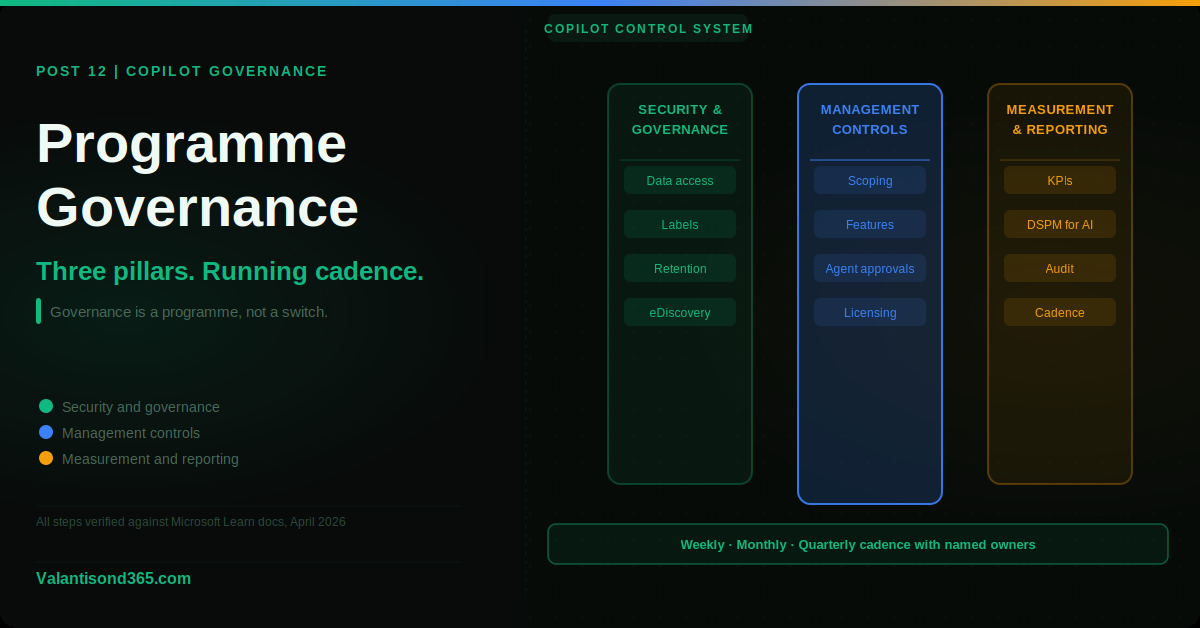
- Three pillars: Security and governance (this series), Management controls (scoping, features, agent approvals), Measurement and reporting (usage, risk, value).
- Publish acceptable use rules for prompts before Copilot goes live.
- Use Microsoft Purview DSPM for AI to monitor sensitive data in Copilot interactions.
- Run a weekly, monthly, and quarterly operations cadence with named owners.
- Track KPIs including oversharing remediation rate, RAC and RCD coverage, sensitive data hits, and helpdesk ticket trends.
The Three Pillars of Copilot Governance
The Microsoft Copilot Control System structures governance into three pillars. These are not sequential steps. They run in parallel.
Pillar 1: Security and governance
This is what Posts 1 through 11 of this series have covered: data access controls, sensitivity labels, Conditional Access, retention, audit, and eDiscovery. The goal is to make sure only the right people can access Copilot, only from the right devices, and that the content Copilot touches is properly labeled, retained, and discoverable.
Pillar 2: Management controls
This covers the operational controls that decide what Copilot can do and for whom: scoping Copilot to specific user groups, enabling or disabling features, approving or blocking agents, and managing Microsoft 365 Copilot Chat access. These controls live primarily in the Microsoft 365 admin center.
Pillar 3: Measurement and reporting
This covers tracking whether governance is working: usage trends, risk indicators, value delivered, and KPIs. Without measurement, you cannot answer the question “is our Copilot deployment getting safer or riskier over time?”
| Confirmed as: documented framework. The Copilot Control System with three pillars (Security and governance, Management controls, Measurement and reporting) is documented in the Microsoft Learn Copilot Control System reference. Source: Reference 1. |
Acceptable Use Policy for Copilot Prompts
Publish these rules before Copilot goes live. They should be short, practical, and specific to Copilot usage. A general IT acceptable use policy is not enough.
- Do not paste highly confidential data into a Copilot prompt unless the content is labeled and your organisation’s policy permits it. Copilot logs prompts and they can be discovered in eDiscovery.
- Do not paste personal data or sensitive data such as financial account numbers, passport details, or health information into prompts unless a specific business process and policy permits it.
- Verify and curate Copilot responses before sharing them externally. Copilot can be wrong. Treat its output as a first draft, not a final answer.
- Report suspicious prompts or unexpected outputs to your IT or compliance team. If Copilot returns content you should not have access to, report it immediately.
- Do not use Copilot to attempt to access content in systems or sites you are not authorised to use. Copilot respects your existing permissions but the attempt itself may be logged and reviewed.
| Communicate the AUP before rollout. An acceptable use policy that users have not read does not protect the organisation. Send it before Copilot is enabled for a user group, require acknowledgement where your policy demands it, and repeat it in user training. Discovering a policy violation after the fact is avoidable with proper pre-rollout communication. |
Measurement and Monitoring
DSPM for AI
Microsoft Purview Data Security Posture Management (DSPM) for AI is the primary monitoring tool for Copilot governance. Access it via Microsoft Purview portal > Solutions > DSPM for AI.
What it shows:
- Sensitive data referenced in Copilot prompts and responses, broken down by sensitivity label and information type.
- Activity explorer view of Copilot interactions with data classification context.
- Policy recommendations based on detected risks.
| DSPM for AI requires E5 or the Purview compliance add-on for full access. E3 licensing gives you some Purview reporting capabilities but not the DSPM for AI solution specifically. Confirm your current licensing against the Microsoft Purview service description before planning features that depend on it. Source: Reference 2. |
KPIs to track
These KPIs give you a measurable view of governance health over time:
- Percentage of overshared sites remediated: track month on month from Post 4 DAG reports.
- Number of sites under RAC and RCD: should increase as remediation progresses.
- Sensitive data hits in Copilot interactions: from DSPM for AI. Track trend not just absolute number.
- Time to remediate discovered oversharing issues: measure from discovery to resolution.
- Copilot usage trend: active users, interactions per user, apps used. From Microsoft 365 admin center Copilot dashboard.
- Helpdesk tickets related to Copilot access: a spike often signals a governance gap or a CA policy issue.
Operations Cadence
Assign a named owner to each cadence item. Without ownership, cadence items slip.
Weekly
- Review audit log highlights: any CopilotInteraction records with PolicyDetails failures.
- Review DLP event alerts if DLP policies are in place for Copilot interactions.
- Check for new oversharing alerts from DAG reports.
- Triage Copilot-related helpdesk tickets.
Monthly
- Run access reviews for critical or high-risk sites using Site Access Review.
- Review the agent inventory: which agents are approved, which are pending, which need re-evaluation.
- Check that retention and eDiscovery scopes are still accurate. New sites or users may need to be added.
- Review DSPM for AI sensitive data trends and act on any new policy recommendations.
Quarterly
- Compliance assessment: review all governance controls against your framework requirements.
- Incident simulation: test your response to a hypothetical Copilot data incident. Can you find the content, hold it, and export it within your SLA?
- Executive summary: value delivered (productivity metrics from Copilot dashboard), risk managed (KPIs), and roadmap for the next quarter.
Optional E5 Controls
- Communication Compliance: monitor Copilot interactions for risky prompts or outputs. Requires E5 Compliance. Allows policy-based review of flagged interactions.
- Compliance Manager: use framework templates to track your Copilot governance posture against standards such as ISO 27001, NIST, or your own custom framework.
Validate
- Confirm DSPM for AI is accessible and showing Copilot interaction data.
- Confirm KPIs are defined and have named owners.
- Confirm the weekly, monthly, and quarterly cadence items are scheduled in a recurring meeting or task system.
- Confirm the acceptable use policy has been published and communicated to all Copilot users.
| Expected result: DSPM for AI shows Copilot interaction data. KPI dashboard exists with current values. Cadence meetings are scheduled with named owners. AUP is accessible to all Copilot users. |
Lessons Learned
- Name owners before the cadence starts. A cadence without named owners is a wishlist. Assign specific people to each weekly, monthly, and quarterly item at the start of the programme. Review ownership quarterly.
- Start DSPM for AI before rollout, not after. You need a baseline of what normal looks like before Copilot goes live. If you start monitoring after users are already using Copilot, you cannot distinguish baseline noise from a real signal.
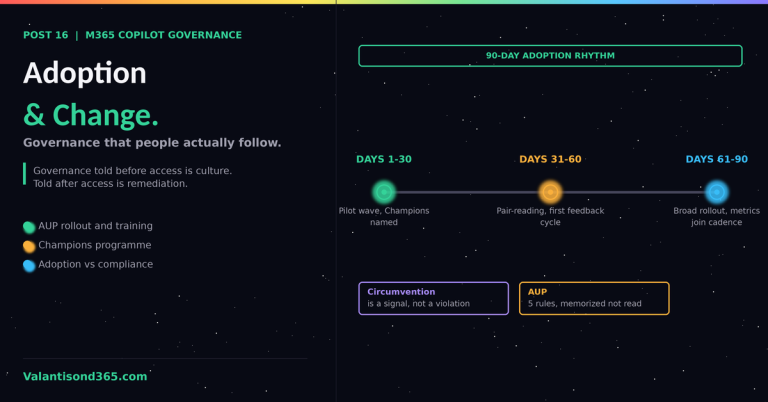
- The AUP is a living document. Update it as new Copilot features roll out, as new agents are approved, and as you learn from incident simulations. A policy written at launch and never revisited becomes irrelevant quickly.
- Executive summaries drive investment. The governance programme needs budget and attention. Quarterly summaries that show value delivered alongside risk managed are the mechanism for getting both. Frame every KPI as a business outcome, not just a technical metric.
References
All links verified Mai 2026.
1. Copilot Control System security and governance Documents the three pillars of the Copilot Control System and the foundational and optimised controls in each pillar.
https://learn.microsoft.com/en-us/copilot/microsoft-365/copilot-control-system/security-governance
2. Data Security Posture Management for AI Overview of DSPM for AI capabilities, the activity explorer AI tab, and licensing requirements.
https://learn.microsoft.com/en-us/purview/ai-microsoft-purview
3. Use Microsoft Purview to manage data security and compliance for Microsoft 365 Copilot Overview of all Purview capabilities for Copilot governance including Communication Compliance and Compliance Manager.
https://learn.microsoft.com/en-us/purview/ai-m365-copilot