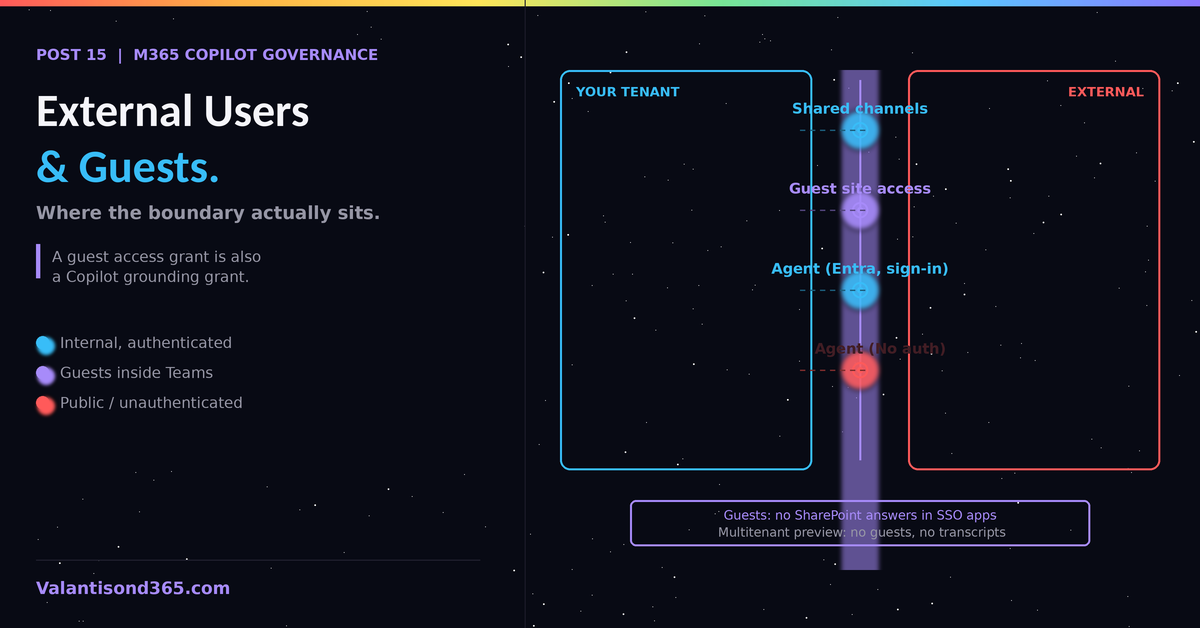
What guests can reach, what agents can serve externally, and the documented limits
TL;DR
- M365 Copilot grounding respects the permissions you granted external users. Cross-tenant collaboration surfaces (shared channels, guest site access) are part of what Copilot can retrieve for those users’ counterparts inside your tenant.
- For Copilot Studio, external reach is an authentication decision: Entra ID with Require users to sign in keeps the agent internal; manual authentication with other OAuth providers or No authentication opens it externally.
- Documented limitation: guest users cannot access AI-generated answers from SharePoint and Microsoft Copilot connector (formerly Graph connector) knowledge sources in SSO-enabled apps.
- Multitenant mode for Copilot Studio agents is public preview, does not support guest users or group conversations, and turns off conversation transcripts entirely.
Two separate questions
External access and Copilot intersect in two directions that get conflated in almost every client discussion. Keep them apart:
- Direction 1: Your internal users use Copilot, and Copilot can ground on content that external parties placed into your tenant or that you share with them (shared channels, guest-accessible sites).
- Direction 2: External people use your Copilot surfaces, primarily Copilot Studio agents published to channels that guests or unauthenticated users can reach.
Direction 1: Copilot grounding and externally shared content
Microsoft’s privacy documentation is explicit that Copilot only surfaces organizational data to which individual users have at least view permissions, and it names inter-tenant collaboration directly: this includes permissions you give to users outside your organization through solutions such as shared channels in Microsoft Teams.
The governance consequences follow from Posts 2 through 5 of this series:
- Guest access grants are Copilot grounding grants. A guest with site access is a user whose content world includes that site; your users’ Copilot can also ground on whatever the external collaboration brought into the tenant.
- The DAG oversharing reports (Post 4) include the “Everyone except external users” pattern precisely because the boundary between internal-wide and external-inclusive sharing is where mistakes happen.
- Sensitivity labels with encryption travel with the file, and protection settings remain enforced even when labeled files are stored outside the Microsoft 365 tenant. Labels are therefore the control that survives the boundary crossing.
| Review external sharing before Copilot, not after. SharePoint tenant-level external sharing settings, expiration for guest access, and the DAG guest-access report form the pre-Copilot review. Every external sharing decision made in the last five years becomes retrievable context the day Copilot is enabled. |
Direction 2: Copilot Studio agents reaching external users
Whether an agent can serve external users is set by its authentication configuration, documented in CS Post 2 and extended here with the external-facing specifics. As of September 2026:
| Authentication option | External reach | Governance note |
| Authenticate with Microsoft | Internal only. Teams channel, user always signed in. | Audience controlled via agent sharing. The safe default. |
| Authenticate manually (Entra ID, Require sign-in on) | Internal identities; sharing controls who can chat. | Supports more channels while keeping audience control. |
| Authenticate manually (other OAuth2 providers) | External users with those identities can sign in. | Audience control through agent sharing is not available the same way; sign-in requirement is configurable. |
| No authentication | Anyone with the link. | Block via data policy (CS Post 1). Copilot Studio warns at share time that anyone can chat. The warning does not block. |
Source for the authentication behavior table: Reference 3.
A new authentication path is coming to this table. Microsoft announced Entra-based delegated user access and service-to-service authentication for Copilot Studio agents, reaching General Availability on September 30, 2026. Once available, this gives admins a way to authenticate agent calls made through the Microsoft 365 Agents SDK from existing web and native applications, in addition to the delegated end-user methods above. Treat it as a fourth external-reach option to evaluate once it ships, not yet a documented behavior to design around.
Documented limitations to design around
Guest users cannot access AI-generated answers from SharePoint and Microsoft Copilot connector (formerly Graph connector) data sources in SSO-enabled applications.
This is confirmed on multiple current Copilot Studio pages, not just the SSO configuration guide, so treat it as a hard platform limitation rather than an edge case.
If the agent’s value depends on SharePoint knowledge and the audience includes guests, this limitation breaks the scenario. A related, separate limitation: single sign-on is not supported for connectors at all when an agent uses custom Active Directory authentication and is deployed to Microsoft Teams; in that configuration every user authenticates to each connector manually. Confirmed as: documented limitation. Source: Reference 4, Reference 6.
Multitenant mode (an agent hosted in one tenant, used from another) is public preview and carries a longer limitation list than a quick read suggests: guest users are not supported, only one-on-one conversations work (group conversations do not), multi-geo is not supported, end-user authentication is not supported at all (the client cannot complete the identity handoff across tenants), OAuth for manual authentication is not supported, and both standard Microsoft 365/Graph connectors and custom connectors are not supported. Only maker authentication (service principal) on standard tools works in this preview.
Conversation transcripts are turned off entirely in multitenant mode, specifically to protect downstream tenant privacy, which means you cannot audit those conversations the way Post 14 assumes for a normal agent. Preview features are not supported for generally available production use. Confirmed as: documented preview limitations. Source: Reference 5.
Tools with user authentication prompt each user for their own credentials. For external audiences this means every external user needs a valid identity against the tool’s provider, which in practice rules out most business-data tools for anonymous or consumer-identity audiences.
Decision guide for external-facing agents
- Audience is your own tenant only: Authenticate with Microsoft or Entra ID manual with sign-in required.
- Audience includes guests inside Teams: verify every knowledge source against the guest limitation above before committing. Treat this as a higher-risk configuration requiring admin review before it goes live.
- Audience is the public (website channel): No authentication or non-Entra OAuth. Treat the agent as a public publication: no internal knowledge sources, no business-data tools, content moderation reviewed, and the Protection status check from CS Post 2 before every share.
Lessons Learned
- The phrase “just share it with the partner” carries two governance decisions at once: a permission grant and a Copilot grounding grant. Say both out loud in reviews.
- Labels with encryption are the only control in the stack that keeps working after content leaves the tenant.
- For external-facing agents, design from the limitation list up, not from the demo down. The guest SharePoint limitation has ended more than one architecture late in a project.
References
- 1. Data, privacy, and security for Microsoft 365 Copilot, Microsoft Learn: learn.microsoft.com/en-us/copilot/microsoft-365/microsoft-365-copilot-privacy
- 2. Microsoft 365 Copilot data protection architecture, Microsoft Learn: learn.microsoft.com/en-us/microsoft-365/copilot/microsoft-365-copilot-architecture-data-protection-auditing
- 3. Configure user authentication, Microsoft Learn: learn.microsoft.com/en-us/microsoft-copilot-studio/configuration-end-user-authentication
- 4. Configure single sign-on with Microsoft Entra ID, Microsoft Learn: learn.microsoft.com/en-us/microsoft-copilot-studio/configure-sso
- 5. Overview of multitenant mode in Copilot Studio (preview), Microsoft Learn: learn.microsoft.com/en-us/microsoft-copilot-studio/multi-tenant-overview
- 6. Use connectors in Copilot Studio agents, Microsoft Learn: learn.microsoft.com/en-us/microsoft-copilot-studio/advanced-connectors
- 7. Microsoft Copilot Studio – Securely connect with Entra-based user and S2S authentication (Message Center MC1465301), Microsoft 365 Message Center